EMMET For HTML

<!DOCTYPE html>
<html lang="en">
<head>
    <meta charset="UTF-8">
    <meta name="viewport" content="width=device-width, initial-scale=1.0">
    <title>Document</title>
</head>
<body>

</body>
</html>
This is the most basic template that will be required every time you write HTML. There was a time when a developer write it manually
→ typing ‘<‘ then
→ ! then changing to caps(or hold shift),
→ type DOCTYPE
→ get back to smalls type html then closing >.
Its is enought fearful to read right ? , Imagine repeating the similar process for this complete code, extend it to a complete landing page and to lower your BP extend it to a complete website of 9 -10 pages. DEATH ?
COOL DOWN COOL DOWN, that age has been passed. Now there is tool that is not less than a magic called EMMET is here us to save us.
Before jumping ahead just open your editor and make a new html file and type ! and press enter.
!
BOOM saw the power of EMMET ?
<!DOCTYPE html>
<html lang="en">
<head>
    <meta charset="UTF-8">
    <meta name="viewport" content="width=device-width, initial-scale=1.0">
    <title>Document</title>
</head>
<body>

</body>
</html>
Complete boiler plate code appeared all of without manual typing efforts.
This is just a trailer of EMMET. Will say more ahead.
FIrst let see what actually the EMMET is and why it is usefull for us ?
What is EMMET ?
Emmet is a shortcul tool for writing fast HTML and not only limited to HTML it also works in CSS with same potential.
Rather than writing complete tag for HTML, using emmet we can just write abbrevations of HTML tags and emmet complete them for us. For example, you typediv and press enter and EMMET will make it <div></div> for us.
Why EMMET ?
You may think that i can also copy paste the tags why use emmet ?
Well you are right, you can copy paste or fast type but a possibility of error is always there that you copy paste wrong or type incorrect.
But emmet there is no such cases are there.
Yeah it is an autocomplete but the smarter one.
For tags requiring closing part also, it put it by self and for those who don’t need it, EMMET don’t put it.
div
div requires a closing tag.
    <div>

    </div>
img
Img does not require a closing tag
<img src="" alt="">
NOTE: img tag requires attributes like src and alt so EMMET put it by default. Liked it ? Me too✌️.
How Emmet works inside code editor ?
It watches constantly what abbrevations you type and than parsing these abbrevation make a tree and then expand it in complet code.
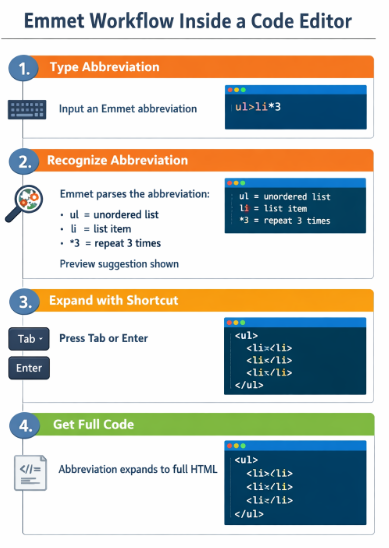
→ In standard code editors like VS code, WebStorm etc EMMET is in built in them no need to install any extension or plugin from outside.
→ Where as some code editors like atom or sublime text or Notepad++ it requires an external plugins.
Creating HTML elements using Emmet
Lets see some basic element div, span, img, a, header etc.
span
    <span>

    </span>
a
<a href=""></a>
Adding classes, IDs, and attributes
EMMET is not limited to creating elements, we can also assign class or ids to elements while ceating only
Here is the syntax of class:
div.div-class
and here is output:
    <div class="div-class">

    </div>
Syntax for assigning id :
div#div-id
and here is output:
<div id="div-id"></div>
You can also add multple classes or id or even combine them. How?
div.class-1#div-id.class-2
See the output.
<div class="class-1 class-2" id="id-2"></div>
Creating nested elements
Moving ahead in exploring EMMET, lets see one more feature of it that makes nested elements very easily.
Just by giving continous elements name separated by ‘>’ ( indicates child of previous one) we can easily create nested elemetns structures.
header>nav>div>span>p>img
Let’s see the output:
<header>
    <nav>
        <div>
            <span>
                <p><img src="" alt=""></p>
            </span>
        </div>
    </nav>
</header>
Felt cool. It is cool.
Repeating elements using multiplication
Another redundancy may arise when we want to create multiple instances of elements.
Copy paste is so non-developers, but for developers EMMET is there.
Suppose we want to create:
<ul>
    <li></li>
    <li></li>
    <li></li>
    <li></li>
    <li></li>
    <li></li>
   </ul>
And EMMET shortcut is:
ul>li*6
‘>’ denotes child of previous element written. It will be decoded like create “6 li child of parent ul”.
We can also combine the above mentioned points. Like following examples:
    ul>li.list-items*5

    <ul>
        <li class="list-items"></li>
        <li class="list-items"></li>
        <li class="list-items"></li>
        <li class="list-items"></li>
        <li class="list-items"></li>
    </ul>
If we want this items to have a numbered id we can use $. See below
    ul>li.items$*5

    <ul>
        <li class="items1"></li>
        <li class="items2"></li>
        <li class="items3"></li>
        <li class="items4"></li>
        <li class="items5"></li>
    </ul>
Same can also be extended to ids. Like:
    ul>li#list-items$*5

    <ul>
        <li id="list-items1"></li>
        <li id="list-items2"></li>
        <li id="list-items3"></li>
        <li id="list-items4"></li>
        <li id="list-items5"></li>
    </ul>
Now I think i have introduced you well with EMMET. As a beginner this is very good to go and as there are lots of there to learn so with time if you want more shortcuts of EMMET you can refer to this cheatsheet.
Wish you a Happy Coding🤞
