Understanding HTML Tags and Elements

HYPER TEXT MARKUP LANGUAGE or HTML is our topic for today.
Try to understand it first in steup up way, we know what is language let us see what is MARKUP LANGUAGE.
It is a system of annotating a document to describe its structure and presentation. Annotating means to add tags to elements of document (text or diagram) , this tags are like explaination or comment. It uses tags to define elements like heading or paragraphs or lists etc. XML is another kind of this language other than html
TEXT is what all you are reading till now, HYPER means above, beyond or outside, this hypertext is something that's gone beyond the limitations of ordinary text, permits you, by clicking with a mouse, to immediately access text in one of millions of different electronic sources, this clickable text is what known called hyperlink.
Collectively HTML incorportes both of this hence adding tags to element and access to another text using hyperlinks.
Going with google definition, “HTML is the standard, foundational markup language used to create and structure web pages. Its structures a complete web page by using different tags(more in next heading) for elements such as <p>, <header>, <h1> and many more.”
It is basically a SKELETON for a web pages on which CSS acts as skin covering and JAVASCRIPT as brain on it.
What an HTML element and tag means ?
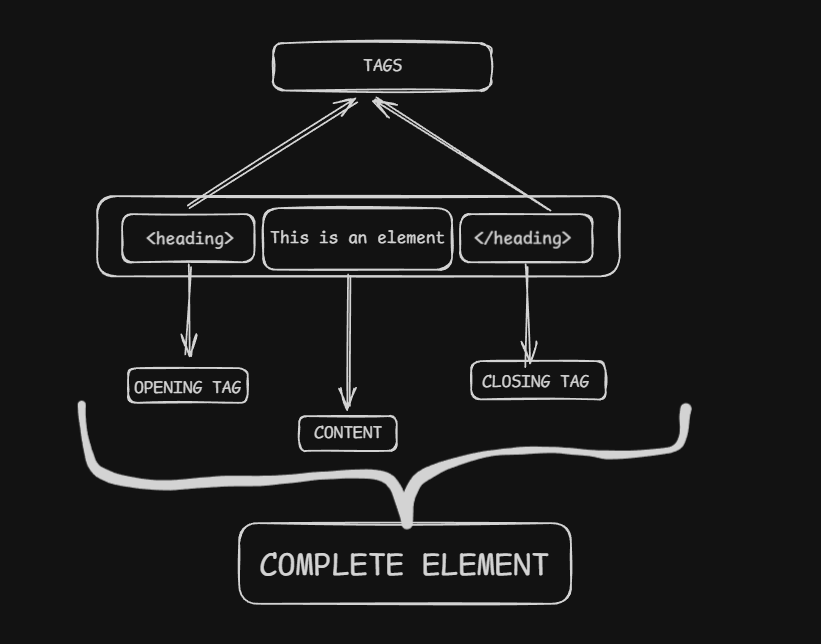
<heading> THIS IS AN ELEMENT </heading>
here this whole <head…….</heading> is known to be as an HTML element.
“THIS IS AN ELEMENT” this known as the content of the element.
and this pink words are what we are calling tags so far.
Now out of both these tags the <heading> is knowns as OPENING tag
and </heading> is known as CLOSING tag. May these image helps you to understand better.
But what are these opening and closing tag.
Opening tag indicates the starting of the element.
<!-- THIS IS THE START --> <heading> THIS IS ELEMENT, BUT TILL WHERE IT GOES ON ? </heading> <!-- THIS IS THE END OF ELEMENT -->
But there are also some elements that do not need closing tags such elements are knows as VOID ELEMENTS.
**WHY they dont need closing tag ?
**Because they do not need to specify their action area as there is <hr> tag , its fucntion is to just put a horizontal line , now there is no need to specify that much lines in website this line will go, by defualt it will be a block level element.
<h1> This is heading element </h1>

<hr>

<h2> This is another element </h2>
This is output:

You must have noticed a word above block level, right ?
Now what is it ? Let’s see it.
BLOCK- LEVEL VS INLINE ELEMENT:
Depending on the deafult width, html elements are of two types:
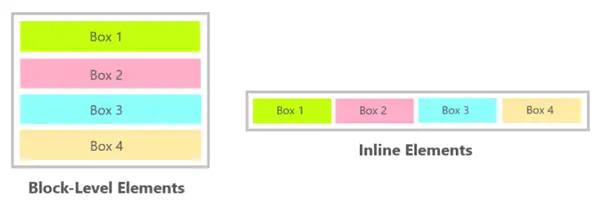
Block level elements have defualt 100% width of the available space irrespective of width of content. Next element will be on new line by defualt.
On the other hand Inline level elements take width equal to the width of content in it.
 <h1>This is BLOCK LEVEL element 1 </h1>
    <h1>This is BLOCK LEVEL element 2 </h1>

    <hr>

    <span> This is INLINE LEVEL element 1 || </span>
    <span> || This is INLINE LEVEL element 2 </span>
Observe the output carefully:

Another example:
SOME COMMON ELEMENTS USED IN HTML:
Heading Elements:
To emphasize the element or text as element, this element is used. They are of six levels from h1 to h6, representing the importance order of heading. h1 is of larget size and h6 is of smallest. However their size can be altered by CSS.
    <h1>THIS IS H1</h1>
    <hr>
    <h2>THIS IS H2</h2>
    <hr>
    <h3>THIS IS H3</h3>
    <hr>
    <h4>THIS IS H4</h4>
    <hr>
    <h5>THIS IS H5</h5>
    <hr>
    <h6>THIS IS H6</h6>
    <hr>
This is output:
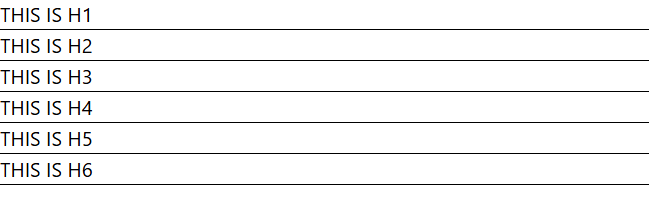
Noticed something, yes it is a block level element.
Paragraph tag(<p></p>):
We had to write some content ofcourse under heading tag, and for all lines using heading tag is not suitable so we use heading tag.
    <p>
        Lorem ipsum dolor, sit amet consectetur adipisicing elit.
        Sapiente veritatis labore provident animi culpa possimus
        corporis, ducimus velit adipisci maxime eos! Quam minus
        cumque ipsa consectetur totam eos. Aliquam, quas!
    </p>
DIV ELEMENT (<div></div>):
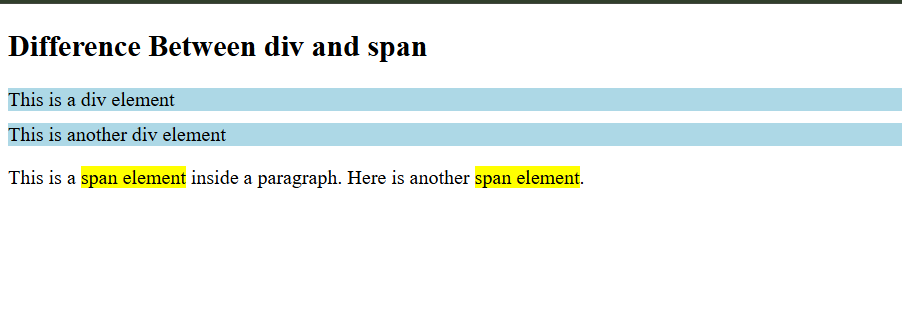
This element is define to use like a container. We can store multiple elements along with their content in this.
<h2>Difference Between div and span</h2>

  <!-- DIV Example -->
  <div>This is a div element</div>
  <div>This is another div element</div>

  <!-- SPAN Example -->
  <p>
    This is a <span>span element</span> inside a paragraph.
    Here is another <span>span element</span>.
  </p>
SPAN ELEMENT(<span>):
This is again used as a container. The difference between this and div is, div is block-level while span is inline level element.
Anchor Tag:
This tag is what allows linking one page to another via links.
<a href="https://css-selectors-guide.hashnode.dev/"> LINK </a>
This ‘href' is attribute of tag a, attribute refer to additional information of the tag.
Like in this case href will contain the link where anchor tag will lead you to.
These are some basics and commonly used elements in HTML. I can help you for exploring more direclty in the page you are reading this, use Cmd+Option+I (Mac) or F12 / (Ctrl+Shift+I) (Windows). There you will see something like this :
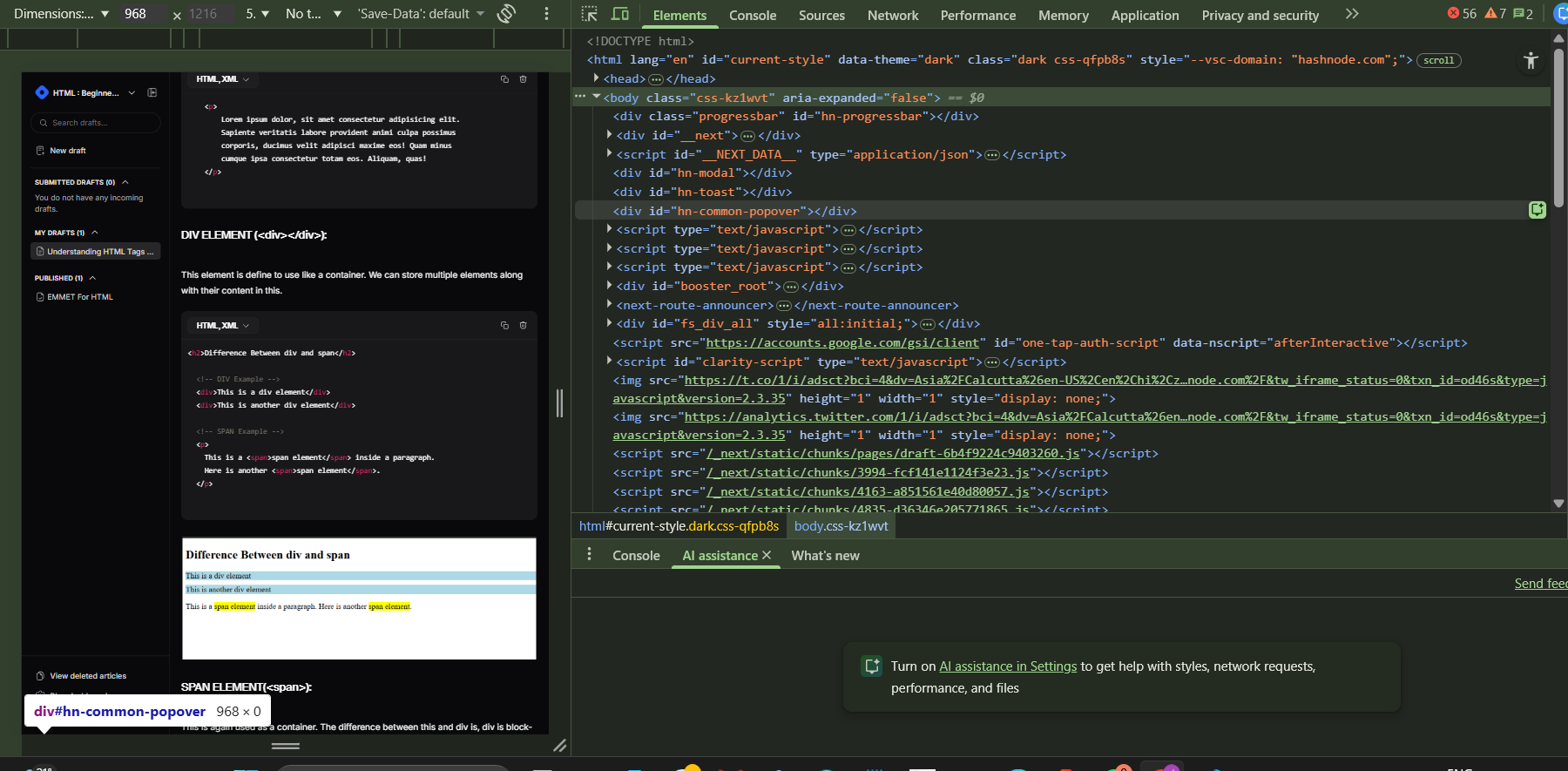
Here you can explore dfferent tyeps of html elements (but beware there is lots of CSS and JAVASCRIPT also there so just avoid them) and to study about them refer to MDN. That all from my side today.
HAPPY HTML✌️.
